# Styled Mode
Choose from a variety of pre-styled themes or develop your own.
## Architecture
PrimeReact is a design agnostic library so unlike some other UI libraries it does not enforce a certain styling such as material design. Styling is decoupled from the components using the themes instead. A theme consists of two parts; _base_ and _preset_. The base is the style rules with CSS variables as placeholders whereas the preset is a set of design tokens to feed a base by mapping the tokens to CSS variables. A base may be configured with different presets,
currently Aura, Material, Lara and Nora are the available built-in options.
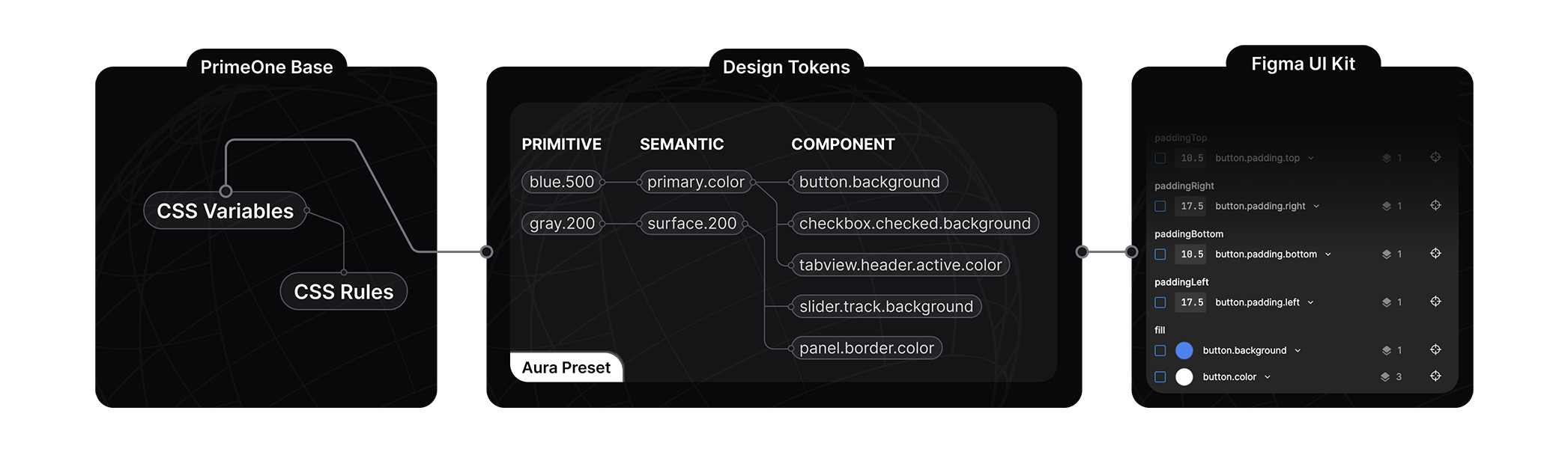
The core of the styled mode architecture is based on a concept named _design token_, a preset defines the token configuration in 3 tiers; _primitive_, _semantic_ and _component_.
Learn more about design tokens at the [Design Tokens Format Module](https://www.designtokens.org/tr/drafts/format/) specification.
### Primitive Tokens
Primitive tokens have no context, a color palette is a good example for a primitive token such as `blue-50` to `blue-900`. A token named `blue-500` may be used as the primary color, the background of a message however on its own, the name of the token does not indicate context. Usually they are utilized by the semantic tokens.
### Semantic Tokens
Semantic tokens define content and their names indicate where they are utilized, a well known example of a semantic token is the `primary.color`. Semantic tokens map to primitive tokens or other semantic tokens. The `colorScheme` token group is a special variable to define tokens based on the color scheme active in the application, this allows defining different tokens based on the color scheme like dark mode.
### Component Tokens
Component tokens are isolated tokens per component such as `inputtext.background` or `button.color` that map to the semantic tokens. As an example, `button.background` component token maps to the `primary.color` semantic token which maps to the `green.500` primitive token.
### Best Practices
Use primitive tokens when defining the core color palette and semantic tokens to specify the common design elements such as focus ring, primary colors and surfaces. Components tokens should only be used when customizing a specific
component. By defining your own design tokens as a custom preset, you'll be able to define your own style without touching CSS. Overriding the PrimeReact components using style classes is not a best practice and should be the last resort,
design tokens are the suggested approach.
## Configuration API
### Theme
The `theme` property is used to customize the initial theme.
```tsx
import Aura from '@primeuix/themes/aura';
import { PrimeReactProvider } from '@primereact/core';
import React from 'react';
import ReactDOM from 'react-dom/client';
import App from './App';
const theme = {
preset: Aura,
// Default options
options: {
prefix: 'p',
darkModeSelector: 'system',
cssLayer: false,
cssVariables: true,
scoped: false
}
};
ReactDOM.createRoot(document.getElementById('root')).render(
);
```
### Options
The `options` property defines the how the CSS would be generated from the design tokens of the preset.
#### prefix
The prefix of the CSS variables, defaults to `p`. For instance, the `primary.color` design token would be `var(--p-primary-color)`.
```tsx
options: {
prefix: 'my';
}
```
#### darkModeSelector
The CSS rule to encapsulate the CSS variables of the dark mode, the default is the `system` to generate `@media (prefers-color-scheme: dark)`. If you need to make the dark mode toggleable based on the user selection define a
class selector such as `.app-dark` and toggle this class at the document root. See the dark mode toggle section for an example.
```tsx
options: {
darkModeSelector: '.my-app-dark';
}
```
#### cssLayer
Defines whether the styles should be defined inside a [CSS layer](https://developer.mozilla.org/en-US/docs/Web/CSS/@layer) by default or not. A CSS layer would be handy to declare a
custom cascade layer for easier customization if necessary. The default is `false`.
```tsx
options: {
cssLayer: {
name: 'primereact',
order: 'app-styles, primereact, another-css-library'
}
}
```
#### cssVariables
Controls whether component design tokens are generated as CSS variables or inlined as static values. Primitive and semantic tokens are always generated as CSS variables.
#### scoped
Scopes the generated CSS variables to the components only instead of the document root and host elements. Defaults to `false`.
#### classPrefix
Sets the prefix of the component class names, `p` by default. With `my`, the `p-button` class becomes `my-button` in both the generated CSS and the rendered markup. The icon classes `p-icon` and `p-icon-*` keep the `p-` name, and classes passed from the app, such as `className`, are not renamed.
```tsx
options: {
classPrefix: 'my';
}
```
### Presets
Aura, Material, Lara and Nora are the available built-in options, created to demonstrate the power of the design-agnostic theming. Aura is PrimeTek's own vision, Material follows Google Material Design v2, Lara is based on Bootstrap and
Nora is inspired by enterprise applications. Visit the [source code](https://github.com/primefaces/primeuix/tree/main/packages/themes/src/presets)
to learn more about the structure of presets. You may use them out of the box with modifications or utilize them as reference in case you need to build your own presets from scratch.
### Reserved Keys
Following keys are reserved in the preset scheme and cannot be used as a token name; `primitive`, `semantic`, `components`, `directives`, `colorscheme`, `light`, `dark`, `common`, `root`, `states`, and `extend`.
### Colors
Color palette of a preset is defined by the `primitive` design token group. You can access colors using CSS variables or the `$dt` utility.
```tsx
// With CSS
var(--p-blue-500)
// With JS
$dt('blue.500').value
```
## Dark Mode
PrimeReact uses the `system` as the default `darkModeSelector` in theme configuration. If you have a dark mode switch in your application, set the `darkModeSelector` to the selector you utilize such as `.my-app-dark` so that PrimeReact can fit in
seamlessly with your color scheme.
```tsx
import { StrictMode } from 'react';
import { createRoot } from 'react-dom/client';
import App from './App.tsx';
import { PrimeReactProvider } from '@primereact/core';
import Aura from '@primeuix/themes/aura';
const primereact = {
theme: {
preset: Aura,
options: {
darkModeSelector: '.my-app-dark'
}
}
};
createRoot(document.getElementById('root')!).render(
);
```
Following is a very basic example implementation of a dark mode switch, you may extend it further by involving `prefers-color-scheme` to retrieve it from the system initially and use `localStorage` to make it stateful. See this [article](https://dev.to/abbeyperini/dark-mode-toggle-and-prefers-color-scheme-4f3m) for more information.
```tsx
```
```tsx
const toggleDarkMode = () => {
document.documentElement.classList.toggle('my-app-dark');
};
```
In case you prefer to use dark mode all the time, apply the `darkModeSelector` initially and never change it.
```tsx
```
It is also possible to disable dark mode completely using `false` or `none` as the value of the selector.
```tsx
theme: {
preset: Aura,
options: {
darkModeSelector: false || 'none',
}
}
```
## Customization
### definePreset
The `definePreset` utility is used to customize an existing preset during the PrimeReact setup. The first parameter is the preset to customize and the second is the design tokens to override.
```tsx
import { StrictMode } from 'react';
import { createRoot } from 'react-dom/client';
import App from './App.tsx';
import { PrimeReactProvider } from '@primereact/core';
import { definePreset } from '@primeuix/themes';
import Aura from '@primeuix/themes/aura';
const MyPreset = definePreset(Aura, {
//Your customizations, see the following sections for examples
});
const primereact = {
theme: {
preset: MyPreset
}
};
createRoot(document.getElementById('root')!).render(
);
```
### Color Scheme
Tokens can be defined per color scheme using the `light-dark` function, allowing each token to hold scheme-specific values.
```tsx
const MyPreset = definePreset(Aura, {
semantic: {
primary: {
color: 'light-dark({primary.500}, {primary.400})',
contrastColor: 'light-dark(#ffffff, {surface.900})'
}
}
});
```
### Primary
The `primary` defines the main color palette, default value maps to the `emerald` primitive token. Let's setup to use `indigo` instead.
```tsx
const MyPreset = definePreset(Aura, {
semantic: {
primary: {
50: '{indigo.50}',
100: '{indigo.100}',
200: '{indigo.200}',
300: '{indigo.300}',
400: '{indigo.400}',
500: '{indigo.500}',
600: '{indigo.600}',
700: '{indigo.700}',
800: '{indigo.800}',
900: '{indigo.900}',
950: '{indigo.950}'
}
}
});
```
### Surface
The color scheme palette that varies between light and dark modes is specified with the surface tokens. Example below uses `stone` for light mode and `zinc` for dark mode using the `light-dark` function. With this setting, light mode, would have a grayscale tone and dark mode would include bluish tone.
```tsx
const MyPreset = definePreset(Aura, {
semantic: {
surface: {
0: '#ffffff',
50: 'light-dark({stone.50}, {zinc.50})',
100: 'light-dark({stone.100}, {zinc.100})',
200: 'light-dark({stone.200}, {zinc.200})',
300: 'light-dark({stone.300}, {zinc.300})',
400: 'light-dark({stone.400}, {zinc.400})',
500: 'light-dark({stone.500}, {zinc.500})',
600: 'light-dark({stone.600}, {zinc.600})',
700: 'light-dark({stone.700}, {zinc.700})',
800: 'light-dark({stone.800}, {zinc.800})',
900: 'light-dark({stone.900}, {zinc.900})',
950: 'light-dark({stone.950}, {zinc.950})'
}
}
});
```
### Noir
The `noir` mode is a sleek, monochrome variant where the primary color is derived from the neutral `surface` palette instead of a distinct accent color. The example below maps the primary palette to surface tones and uses the `light-dark` function to define the light and dark values of the primary and highlight tokens in a single place;
```tsx
const Noir = definePreset(Aura, {
semantic: {
primary: {
50: '{surface.50}',
100: '{surface.100}',
200: '{surface.200}',
300: '{surface.300}',
400: '{surface.400}',
500: '{surface.500}',
600: '{surface.600}',
700: '{surface.700}',
800: '{surface.800}',
900: '{surface.900}',
950: '{surface.950}',
color: 'light-dark({primary.950}, {primary.50})',
contrastColor: 'light-dark(#ffffff, {primary.950})',
hoverColor: 'light-dark({primary.800}, {primary.200})',
activeColor: 'light-dark({primary.700}, {primary.300})'
},
highlight: {
background: 'light-dark({primary.950}, {primary.50})',
focusBackground: 'light-dark({primary.700}, {primary.300})',
color: 'light-dark(#ffffff, {primary.950})',
focusColor: 'light-dark(#ffffff, {primary.950})'
}
}
});
```
### Forms
The design tokens of the form input components are derived from the `form.field` token group. This customization example changes border color to primary on hover. Any component that depends on this semantic token such as
`dropdown.hover.border.color` and `textarea.hover.border.color` would receive the change.
```tsx
const MyPreset = definePreset(Aura, {
semantic: {
formField: {
hoverBorderColor: '{primary.color}'
}
}
});
```
### Focus Ring
Focus ring defines the outline width, style, color and offset. Let's use a thicker ring with the primary color for the outline.
```tsx
const MyPreset = definePreset(Aura, {
semantic: {
focusRing: {
width: '2px',
style: 'dashed',
color: '{primary.color}',
offset: '1px'
}
}
});
```
### Component
The design tokens of a specific component is defined at `components` layer. This configuration is global and applies to all card components, in case you need to customize a particular component on a page locally, view the Scoped CSS section for an example.
**Tip:** Overriding component tokens is best suited for small adjustments. For heavy customization, building your own preset is the recommended approach.
```tsx
const MyPreset = definePreset(Aura, {
components: {
card: {
root: {
background: 'light-dark({surface.0}, {surface.900})',
color: 'light-dark({surface.700}, {surface.0})'
},
subtitle: {
color: 'light-dark({surface.500}, {surface.400})'
}
}
}
});
```
### Typography
Typography tokens are defined at the semantic level for consistency and at the component level for specialization.
```tsx
const MyPreset = definePreset(Aura, {
semantic: {
typography: {
lineHeight: '1.5',
fontFamily: 'inherit',
fontWeight: 'normal',
fontSize: '0.875rem'
},
formField: {
fontWeight: '{typography.font.weight}',
fontSize: '{typography.font.size}'
}
},
components: {
select: {
fontSize: '{form.field.font.size}',
fontWeight: '{form.field.font.weight}'
}
}
});
```
### Extend
The theming system can be extended by adding custom design tokens and additional styles. This feature provides a high degree of customization, allowing you to adjust styles according to your needs, as you are not limited to the default tokens.
The example preset configuration adds a new `accent` button with custom `button.accent.color` and `button.accent.inverse.color` tokens. It is also possible to add tokens globally to share them within the components.
The `css` property is a string, and each `dt('...')` call in it refers to that design token. Plain text keeps the preset serializable, so it can be stored as JSON.
```tsx
const MyPreset = definePreset(Aura, {
components: {
// custom button tokens and additional style
button: {
extend: {
accent: {
color: '#f59e0b',
inverseColor: '#ffffff'
}
},
css: `
.p-button-accent {
background: dt('button.accent.color');
color: dt('button.accent.inverse.color');
transition-duration: dt('my.transition.fast');
}
`
}
},
// common tokens and styles
extend: {
my: {
transition: {
slow: '0.75s',
normal: '0.5s',
fast: '0.25s'
},
imageDisplay: 'block'
}
},
css: `
/* Global CSS */
img {
display: dt('my.image.display');
}
`
});
```
`css` can also be a function that receives `dt` and returns the CSS.
```tsx
const MyPreset = definePreset(Aura, {
components: {
button: {
css: ({ dt }) => `
.p-button-accent {
background: ${dt('button.accent.color')};
color: ${dt('button.accent.inverse.color')};
}
`
}
}
});
```
## Scoped Tokens
Design tokens can be scoped to a certain component using the `dt` property. In this example, first switch uses the global tokens whereas second one overrides the global with its own tokens.
## Utils
### usePreset
Replaces the current presets entirely, common use case is changing the preset dynamically at runtime.
```tsx
import { usePreset } from '@primeuix/themes';
const onButtonClick() {
usePreset(MyPreset);
}
```
### updatePreset
Merges the provided tokens to the current preset, an example would be changing the primary color palette dynamically.
```tsx
import { updatePreset } from '@primeuix/themes';
const changePrimaryColor() {
updatePreset({
semantic: {
primary: {
50: '{indigo.50}',
100: '{indigo.100}',
200: '{indigo.200}',
300: '{indigo.300}',
400: '{indigo.400}',
500: '{indigo.500}',
600: '{indigo.600}',
700: '{indigo.700}',
800: '{indigo.800}',
900: '{indigo.900}',
950: '{indigo.950}'
}
}
})
}
```
### updatePrimaryPalette
Updates the primary colors, this is a shorthand to do the same update using `updatePreset`.
```tsx
import { updatePrimaryPalette } from '@primeuix/themes';
const changePrimaryColor() {
updatePrimaryPalette({
50: '{indigo.50}',
100: '{indigo.100}',
200: '{indigo.200}',
300: '{indigo.300}',
400: '{indigo.400}',
500: '{indigo.500}',
600: '{indigo.600}',
700: '{indigo.700}',
800: '{indigo.800}',
900: '{indigo.900}',
950: '{indigo.950}'
});
}
```
### updateSurfacePalette
Updates the surface colors, this is a shorthand to do the same update using `updatePreset`.
```tsx
import { updateSurfacePalette } from '@primeuix/themes';
const changeSurfaces() {
//changes surfaces both in light and dark mode
updateSurfacePalette({
50: '{zinc.50}',
// ...
950: '{zinc.950}'
});
}
const changeLightSurfaces() {
//changes surfaces only in light
updateSurfacePalette({
light: {
50: '{zinc.50}',
// ...
950: '{zinc.950}'
}
});
}
const changeDarkSurfaces() {
//changes surfaces only in dark mode
updateSurfacePalette({
dark: {
50: '{zinc.50}',
// ...
950: '{zinc.950}'
}
});
}
```
### $dt
The `$dt` function returns the information about a token like the full path and value. This would be useful if you need to access tokens programmatically.
```tsx
import { $dt } from '@primeuix/themes';
const duration = $dt('transition.duration');
/*
duration: {
name: '--transition-duration',
variable: 'var(--p-transition-duration)',
value: '0.2s'
}
*/
const primaryColor = $dt('primary.color');
/*
primaryColor: {
name: '--primary-color',
variable: 'var(--p-primary-color)',
value: {
light: {
value: '#10b981',
paths: {
name: 'semantic.primary.color',
binding: {
name: 'primitive.emerald.500'
}
}
},
dark: {
value: '#34d399',
paths: {
name: 'semantic.primary.color',
binding: {
name: 'primitive.emerald.400'
}
}
}
}
}
*/
```
### palette
Returns shades and tints of a given color from 50 to 950 as an object.
```tsx
import { palette } from '@primeuix/themes';
// custom color
const values1 = palette('#10b981');
// copy an existing token set
const primaryColor = palette('{blue}');
```
## CSS Layer
The PrimeReact CSS layer only applies to styled mode when layering is enabled explicitly at theme configuration, in unstyled mode the built-in CSS classes are not included and as a result no layer is necessary.
### Specificity
The `@layer` is a standard CSS feature to define cascade layers for a customizable order of precedence. If you need to become more familiar with layers, visit the documentation at [MDN](https://developer.mozilla.org/en-US/docs/Web/CSS/@layer) to begin with.
The `cssLayer` is disabled by default, when it is enabled at theme configuration, PrimeReact wraps the built-in style classes under the `primereact` cascade layer to make the library styles easy to override. CSS in your app without a layer has the
highest CSS specificity, so you'll be able to override styles regardless of the location or how strong a class is written.
Layers also make it easier to use CSS Modules, view the CSS Modules guide for examples.
### Reset
In case PrimeReact components have visual issues in your application, a Reset CSS may be the culprit. CSS layers would be an efficient solution that involves enabling the PrimeReact layer, wrapping the Reset CSS in another layer and defining the
layer order. This way, your Reset CSS does not get in the way of PrimeReact components.
```css
/* Order */
@layer reset, primereact;
/* Reset CSS */
@layer reset {
button,
input {
/* CSS to Reset */
}
}
```
## CSS Modules
[CSS modules](https://github.com/css-modules/css-modules) are supported by enabling the `module` property on a style element within your SFC. Use the `$style` keyword to apply classes to a PrimeReact component. It is recommend to enable
`cssLayer` when using CSS modules so that the PrimeReact styles have low CSS specificity.
```css
.myinput {
border-radius: 2rem;
padding: 1rem 2rem;
border-width: 2px;
}
```